Store page
A store page that looks like you, not like a template
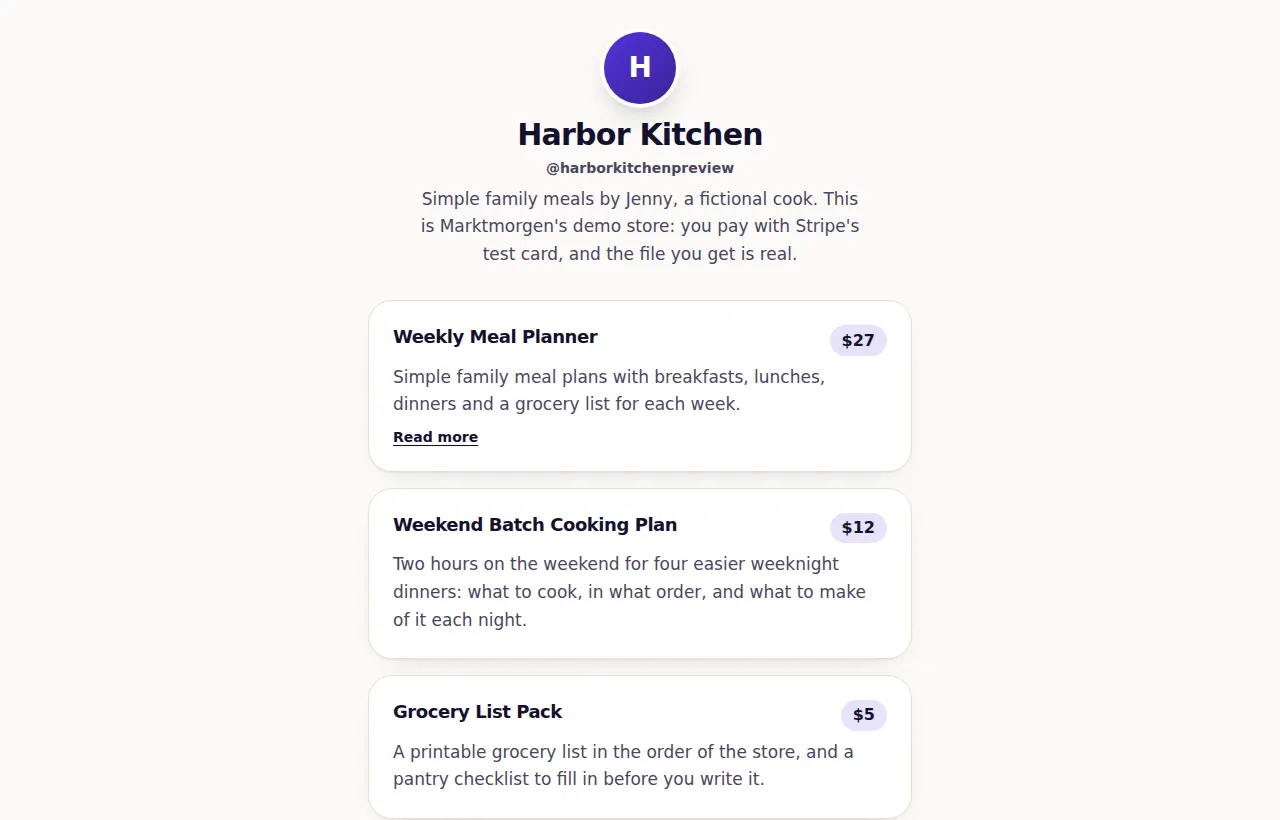
One address with your name, your photo, a line about you, your links and everything you sell. Built to be read on a phone in a few seconds, because that is where your buyer opens it.
Working todayAll plans; limits apply
On this page
Live in three steps
- 1
Take your address
marktmorgen.com/@yourname is yours the moment you take it, and the page is up right away.
- 2
Put up what you sell
Its name, what is inside, the price and a picture. Files, courses, memberships, calls and live sessions, bundles of your products, free things for an email, and plain links. A community for your buyers sits beside them. On Studio and Scale, AI can draft it from two sentences about what you make — the line under your name, your first products and your questions — and you keep what you like.
- 3
Make it look like you
Your photo, one of four themes, one of ten colors or your own, one of five pairings of letters — Modern, Editorial, Elegant, Friendly or Bold — each downloaded only by the pages that use it, and a background behind the cards: plain, a glow of your color, dots, a grid or a slow aurora. The studio shows the page before you save.
What the page carries
- You, at the topYour photo, your name and a line about you, on every theme — not locked behind one — and if you like, a welcome video from YouTube, Vimeo or Loom under them, loaded only when a visitor presses play. Stuck on the line? On Studio and Scale, AI writes three from what you sell, in your store's language, and you pick one or none; sharing the store, it drafts a post for X, an Instagram caption and a LinkedIn post about it too, each with your store's tagged link.
- Up to 2,000 productsEach with its price, what the buyer gets and the button that buys it, in the order you choose, and up to 100 links beside them. A long store shows 24 products a page and a search box above them that finds a product by any words of its name or its one-line summary, accents or not; your studio finds any product by name too.
- A blog on your addressPosts at your store's address, /blog, written in the studio as plain text with headings and lists, each with its own address and title for search engines, and able to end on one of your products. Drafts stay in the studio; the blog has an RSS feed; on Studio and Scale, AI can draft a post from a few words. Your store page links to it once a post is published.
- Pages of your ownUp to 10 pages beside your products — About, Start here, Work with me, Questions, or any page you name — each built from the same blocks as a sales page: a headline, text, pictures, a video, steps, questions, your products and a button to your store or to one product. Each lives at your store's address and on your own domain, and can sit in a menu at the top of your store. Start one from a ready set of blocks, or from nothing.
- Sections, and a line of newsCut a long store into up to 20 sections with a heading over each: a section starts at the product you pick, and moving that product moves its heading. Across the top, one line of your own news of up to 120 characters, which can lead to one of your products.
- Collections, each with its own pageGroup products under a name of your own, like “Beginner guides”: up to 12 collections of up to 24 products each, and a product can be in more than one. Each gets its own page at /@you/shop/<name> to link to from a bio, an email or an ad, and a link above your products on your store page. On it, the products that can go in a cart can be added together, up to four at a time.
- Goes well withOn each product, pick up to three of your other products that go with it. Its page shows them under “Goes well with”, said as your pick, with Add to cart where they can go in one, and the open cart offers them while that product is in it. Nothing about it claims anything about other buyers.
- A picture on each productShown three ways, product by product: small beside the title, beside the title and the summary, or across the top of the card.
- A cover made in one clickNo picture yet? Make a cover in the studio from the product's title, a short line saying what it is (in your store's language) and a line under it, in your store's color and letters. Six designs, each word drawn with enough contrast to read whatever your color. On Stan, by its help center read on October 11, 2026, you select an image of your own, 400 by 400.
- Sell from your own websiteCopy a card or a button for any product and paste it into your blog or site. The card shows the picture, the price and its buyers' rating, changes when you change the product, and opens Stripe's checkout in a new tab. Sales from it are listed under the name you give the place.
- Checkout over your own pagesA link and a short script for WordPress, Webflow, Squarespace, Ghost or your own HTML: pressed, it opens a product's card or your list's sign-up form over the page, on up to 10 sites you list, and a plain link anywhere else. Buyers pay on Stripe's page, on your own Stripe account. Your page hears marktmorgen:checkout, marktmorgen:optin and, back from paying, marktmorgen:purchase; your webhooks get the sale with its utm tags and site. The script sets no cookie and asks for nothing until it is pressed.
- A private podcastSell a show as a product, once or as a membership. Each buyer gets a feed of their own for Apple Podcasts, Overcast, Pocket Casts or most other apps, and new episodes arrive in it like any show's. A refund, or a membership that ends, stops every episode from playing for that buyer within minutes, and podcast directories are told to keep out.
- Buy it as a giftUnder the buy button on a product's page, a buyer can give it instead: the recipient's email, their own name and a message. They pay on Stripe's page; the recipient gets one email and opens it on their own address — its download, its course, the community it opens — and a full refund takes it back. For products bought once that hand over a file, a link, a course or a bundle, at any of their price options.
- Bought for a whole teamUnder the buy button, a buyer can pay for 2 to 200 people at once, your price times that many, on Stripe's page. They get one link to pass on; each person types their own email, opens the link sent to it and has the product on their own address. Never one place more than was paid for, a mistyped address takes none, and a full refund takes every place back. On a product with price options they pick one for everybody. You set up nothing and grant nobody by hand.
- Coming soon, with a waitlistMark a paid product coming soon and its card and page take email addresses instead of payments, each confirmed from the inbox. When you put it on sale, everyone who confirmed gets one email with its link and price, and a note from you if you write one. The box to hear more from you starts empty.
- Pre-orders, paid todaySell it before it is ready: a product coming soon can take pre-orders, with the day it is expected and your word that you refund every pre-order in full if it does not come out. Buyers pay at once and get a receipt with the day. The moment you put it on sale, each one is handed over and its buyer is emailed the way in. Pre-orders stop by themselves after the expected day.
- A page for each productAt /@you/p/<product>: the picture, a long description of up to 5,000 characters, and a title and preview card of its own for search engines and shared links. Or a sales page you build from blocks.
- A description written with AIType a few words about a product and a draft of its short and long description is written into the boxes, in your store's language, from only what you typed: no invented reviews, numbers, results or deadlines. Nothing is saved until you press Save. 40 writing jobs a month on Studio and 80 on Scale; not included on Store or during the free trial. Each request sets aside the most it could cost from the plan's monthly AI budget before it runs, so long ones, like a whole sales page or reading a PDF, use more of it, and the budget can run out before the jobs do. An attempt that fails still counts. The jobs are shared by all the writing help.
- Stars from real buyersReviews only people who paid can write, with the average on the product's card and page.
- Free things, for an emailSet a price of zero and it is handed out for a confirmed email address that joins your list.
- Links with no priceYour channel, your podcast, your booking page — each with a plain icon for the kind of place it leads to, or a small picture of your own in its place (a show's cover, your face), and that site's address printed under it. Group them under headings of your own; put one in the spotlight, larger and in your color; give one a start and an end, for a launch or a live, and it appears and goes by itself; and play a YouTube, Vimeo or Loom video, or a song, album, playlist or podcast from Spotify, SoundCloud, Apple Music or Apple Podcasts, right on the page, loaded only when a visitor presses play. Your studio counts each link's clicks.
- Your profiles under your nameInstagram, TikTok, YouTube, X and 15 more networks, an email and a website, as a row under your name with each network's name and a plain icon. Type a handle or paste an address: a pasted address picks its own network, and a link goes only to that network's own site.
- Support my workA box where a fan who has nothing to buy today can still say thank you: three amounts you choose, each one press away from Stripe's page, or an amount of their own, with a message for you if they want. It goes to your own Stripe account like every sale, and no affiliate or partner share is taken from it. Each one is listed with your sales, with its message. What Ko-fi and Buy Me a Coffee are built on, beside everything you sell.
- A media kit for brandsA page of its own at /@you/media-kit, in your store's look: your introduction (on Studio and Scale, AI drafts three from what you sell and the numbers you give, never others), your audience on each platform with the combined reach, a few lines about who they are, what a collaboration costs, and the brands you have worked with, as plain names. The numbers are yours to type, and the page says so with the day you last changed them; beside them it shows what we counted ourselves, your products and your buyers' rating. Brands write to you through your contact form, and save the page as a PDF with one press.
- An email sign-up boxA box on your store page where visitors join your list without taking anything. An address joins only after its owner presses the button in a confirmation email, so your list holds real inboxes, and sign-ups go on to your welcome emails and your email platform.
- Questions answered on the store pageUp to 12 questions and answers for the whole store — how files arrive, how to pay, how to reach you — opened with a tap and given to search engines as an FAQ. On Studio and Scale, AI drafts them only from what your store says; you edit and save.
- A contact formVisitors write to you from your store page — a question before buying, a collaboration, a booking — and the message lands in your own inbox, with Reply going straight back to them. Nothing is ever sent to the address they type, and up to 20 messages a day reach you.
- "Not sure which one is for you?"On Studio and Scale, with three products or more, a visitor says what they want and sees which of yours fit, and why, picked by AI only from your titles, one-line summaries, prices and notes. When nothing fits, what they looked for reaches your studio — never who asked.
- What buyers say, on the store pageUnder your name, the average of every product's reviews; further down, the newest reviews with words, each with the product it is about. Never a hidden or refunded review, and nothing chosen for its stars.
- A Share buttonUnder your name: the phone's own share sheet, or the address copied on a computer.
- What buyers get nextYour studio shows, for each product, what its buyers went on to buy on a later visit and usually how many days after, counted from your Stripe sales from three buyers up. One press offers it right after paying, or starts a bundle of the two.
- What its buyers also boughtShow how many times each product was bought, and each product's page also says what the same buyers bought with it: “5 buyers bought both”, counted from your own Stripe sales, from three buyers up, never typed. The open cart offers the same, with Add to cart beside each.
- Your page in your orderChoose what comes first under your name: what you sell, what buyers say, your links, Support my work, the sign-up box, your questions and answers, the contact form and the way into your community. Links first for a page that is mostly links, buyers' words above the products, the sign-up box at the top while you build a list. A visitor who searches your store still sees the results first.
- Colors that stay readableEvery color is checked for contrast before your page uses it, so your words never disappear into it.
- Your store, as an appOn iPhone and Android, straight from the browser, your store installs to the home screen as an app of its own, with its name, its icon and its color. No app store.
- Change your address freelyOld addresses stay with your store and lead to the new one, up to ten at once, so the link in your bio keeps working.
- A coach in your studioOnce something is on your store, the studio scores it out of 100 against what stores that sell well have — a picture and a line on every product, a sales page, answers before buying, reviews asked for, a way to stay in touch — and takes you to the place to fix each one.
- Fast on a phoneThe demo store, a real store with photos on it, scored 93 and 94 for performance on Google PageSpeed, on a simulated phone, on October 5, 2026.
Made for the link in your bio
You post on Instagram or TikTok
One link that holds the free guide, the paid plan and the call, instead of a different link every week.
You teach on YouTube
The course, the templates from the video and the channel itself, on one page people can find again.
You run a podcast or a newsletter
The episode links next to the things you sell, with no price on the links and nothing to check out.
What it does not do yet
Said here so nobody signs up expecting it.
- There is one layout, a single column that reads on a phone: you choose the theme, the color, the letters, the background and which part of the page comes first, not where parts sit beside each other.
- Each store supports up to 2,000 products and 100 links.
- No custom code on the page, and the whole store cannot be put inside another website. One product can, as a card or a button.
- Buyers pay through Stripe, with the ways to pay your own Stripe account has on. Do not count on PayPal: Stripe offers it only to accounts in the EU (except Hungary), the UK, Switzerland, Norway and Liechtenstein, and its documentation, read on September 28, 2026, lists it as not supported for direct charges, which is how every sale here is charged.
Questions about the store page
What is a store page here?
Your own page at marktmorgen.com/@yourname, with an address you choose: your store's name, a line about it, your photo if you add one, your links and the products you list. It is made to be read on a phone.
How do I start my store page?
Press “Start your store”, type your email and press “Email me a link”. Open the link we email you and press “Log me in”, then fill in “Your address”, “Store name” and, if you like, “One line about it”, and press “Create my store”. No password is needed.
Can I try a store page before paying?
Yes. Paid plans are not on sale yet, so there is nothing to pay for now, and you can set up your page in your own store's studio with no card. Files and lesson videos can be uploaded once a paid plan starts. Until a plan is paid, your store has smaller limits, for the whole trial or each month without a plan, and only so many stores without a paid plan can run each month, so some of its work can pause for a while. To see a store working, open the live demo store from the link at the end of this page: a made-up store, marked as a demo.
Do store pages work?
We publish no number of stores, visits or sales, because we do not have a real, checked count to show. The live demo store linked at the end of this page is made up, so nothing on it is a figure about real creators.
Can I change my store address later?
Yes, whenever you want, from your studio. Nobody has to be asked and there is nothing to wait for. Your store does not move: same page, same name, same description, same products. Only the address changes. Every address your store holds keeps working and sends people to the current one, so the link already in your bio, in old posts and in messages other people sent still leads to you. A store holds up to ten addresses at once. When it is full, you can still go back to one you already had; for a new one, let an old one go first. An address you let go stops working at once, leads nowhere for 30 days, and after that anyone may take it, so only let go of one you are sure was never given to anyone.
Is the page up before I connect Stripe?
Yes. The page, the editor and your address are free and stay free; without a plan, the page is shown for 475 visits a month. Taking a card needs two things: Stripe has cleared your account, and your plan or its 14-day trial is running. Until then the page says plainly that it cannot take a payment.
Can I use my own domain?
Yes, on Studio. In your studio, type the domain you own — shop.yourname.com, or yourname.com — and we show you the two records to add where you bought it: one that sends visitors to your store, and a TXT record that proves the domain is yours, so no other store can use it. When they show up, your store opens on that domain, with its certificate handled for you. Your marktmorgen.com address keeps working too, and if Studio ends, visitors to the domain are sent there.
How do I see what the page looks like before I save?
The studio shows the page with your photo, theme, color and letters as you change them, before anything is saved.
Is there a limit on how many people can visit?
Your plan covers a number of visits a month: 3,400 on the $69 plan, 10,000 on the $449 plan and 40,000 on the $999 plan. A visit is one person opening your store on one day, however many pages they look at, and you are never counted. Visits are never billed: public pages pause at 95% of the figure until the month turns or a plan change gives a larger one, and the last 5% are kept for your buyers' courses, community and podcasts. Your studio shows the count as it grows.
Can one account run more than one store?
Yes, up to five, each with its own address, products and Stripe account, and a plan of its own to take payments. You switch between them at the top of your studio.
A practical way to use it
- 1
Put the decision beside the product
Keep the product, price and description of what is delivered at the same address. The buyer can inspect the offer before choosing it, rather than assembling the details from separate posts.
Check the terms before you commit
Your work stays yours. Read how payments, data and leaving the platform work, then decide whether the fit is right.
Your own Stripe account
Direct charges use the creator’s Stripe account. Stripe processing, payout timing, refunds and disputes still apply.
Follow the payment pathYour records can leave with you
Export the contact and order records your role can access. Keep a copy before closing a store; export does not move subscriptions to another provider.
Read the data policyCancellation from your studio
Manage an existing platform subscription through Account. Review its end date and what closing a store changes for buyers.
Review cancellation termsA clear platform refund policy
The first platform payment can be requested back in full within 30 days, under the Terms. A buyer’s refund for a creator’s product follows that offer and applicable rights.
Read the refund terms
Paid plans and paid selling remain subject to all opening gates. These terms do not mean sales are open or that earnings are guaranteed.
Works well with
Every featurePrepare your own store
Take your address and put your first product up today. The plan is $69 a month and 0% of your sales, and it is not on sale yet.