Sales and landing pages
A page that sells it, built from blocks
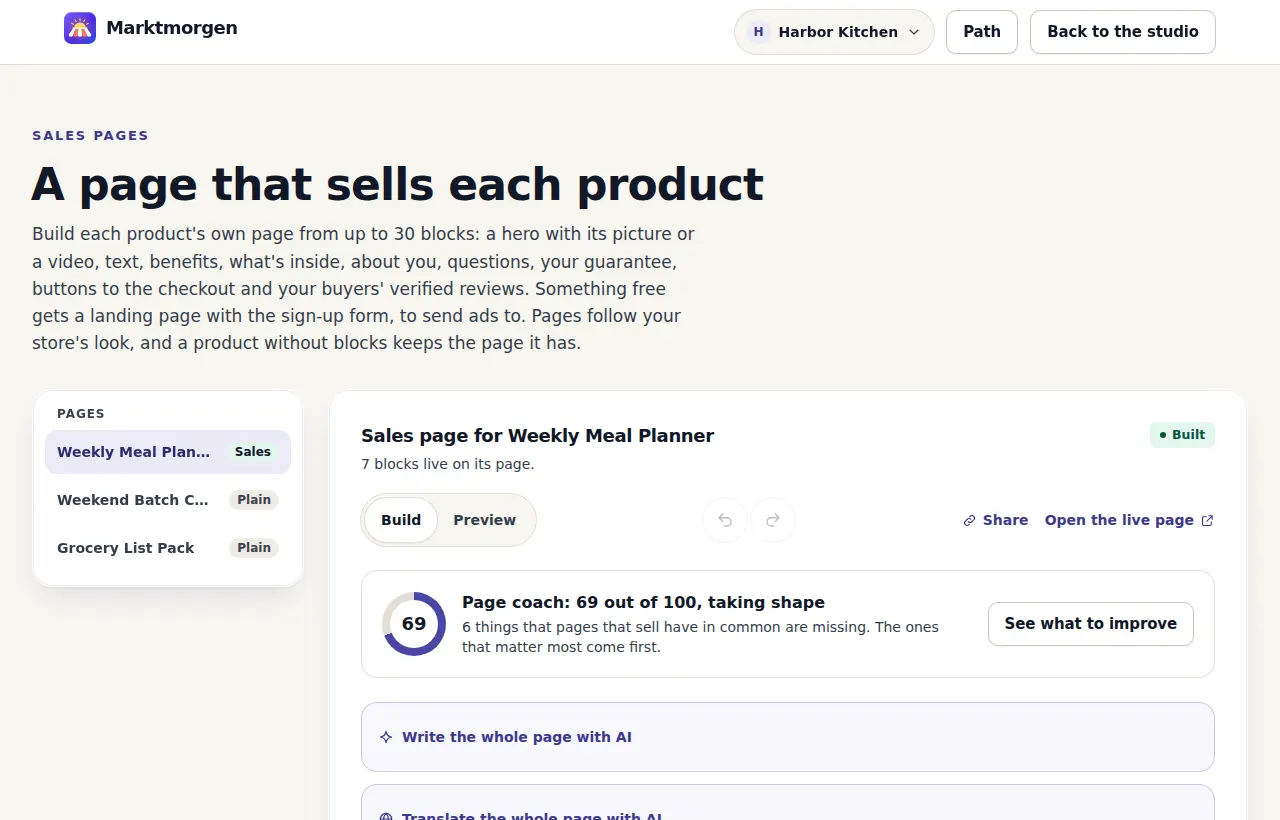
Any product's own page can be laid out by you: a headline with a picture or a video, your own pictures, what the buyer gets, what is inside, who it is for and who it is not for, how it works step by step, a comparison table, bonuses, numbers counted by your store, things said about it elsewhere with links to where, who made it, questions, your guarantee, a countdown to a real deadline, buttons and real buyers' reviews. Start from a template, from an AI draft (Studio and Scale) or from nothing. For something free, the same page asks for an email.
Working todayAll plans; limits apply
On this page
From a product to a page
- 1
Open the product's page
In your studio, under Sales pages. A product without blocks keeps the plain page it always had.
- 2
Stack the blocks, or have AI draft them on Studio and Scale
Start from another of your products' pages, its blocks copied with their words for you to change, or from one of six templates — an ebook, a course, a call, a membership, a launch with a deadline, a free download — each an order of blocks with its headings and the questions buyers of it ask, and the words yours to write. Drag a block to move it. Up to 30, in the order you want, with a preview beside them before anything is saved. Or press Write the whole page with AI: a full draft — headline, what the buyer gets, what is inside, questions and buttons — from the product's own description, for you to read and change. Selling in another language? Translate the whole page with AI in one step, into Spanish, French, German, Italian, Dutch, Portuguese or English: every heading, point, question, button and picture description, names and numbers kept as they are, and Undo puts it back. For a PDF, it can read the first ten pages of the file itself first, so what is inside is listed from the real contents.
- 3
Share one link
Your store address, /p/ and the product. The buy button on the page opens the same checkout the store page does.
What a page is built from
- A gallery of blocksEvery block with its icon and what it is for, grouped by what it does on the page, with a box to find one by name. Add it at the end or right between two blocks, where it goes.
- Phones, or computersKeep any block to phones only, or to computers and tablets only: a shorter list where the screen is small, a wide table where it fits. The preview shows each width.
- Share it anywhereThe page's link to copy, a QR code to download as SVG for print or PNG for slides, and X, Facebook, LinkedIn, WhatsApp and email ready to post from. Each link is tagged with where it went, so your numbers show which one brought visitors and sales. Short of words? On Studio and Scale, AI drafts a post for X, an Instagram caption and a LinkedIn post from what the page says, in your store's language, with the right tagged link in each, for you to change and copy.
- Work on it out of sightSwitch a page off and save as often as you like: visitors see the product's plain page until you switch it on, or until a moment you choose, when it shows by itself. Nothing on a hidden page is answered from or counted.
- Earlier versionsUndo and Redo while you edit, a step at a time, from the buttons or Ctrl+Z. And the page as it was before each of your last five saves, kept as long as the page is: load one into the editor, look it over, and save it to put it back live. Duplicate any block to start the next one from it.
- Saved sectionsKeep a group of up to 8 blocks under a name and put it on any page of your store. Change it on one page, then update it on the other pages you check, after seeing which pages use it. Sections in your library: 10 on Store, 30 on Studio, 50 on Scale. Pictures stay on the page that shows them, and a page with its own pictures in the section, or a test running, is changed by hand.
- Three page stylesPlain, bands or cards: every other section on a soft wash of your store's color, or each section on a card of its own. Switch in the preview and see the page redraw before you save. The colors are checked so every line still reads.
- HeroA headline of up to 120 characters and a line under it, beside the product's picture or a video, centered above it, or with the picture behind the words, darkened so they read on any picture. A button under the headline, if you want one.
- Video that waitsOne beside the headline and as many more as the page needs, each in a block of its own with a heading and a line under it. From YouTube, Vimeo or Loom. Nothing from them loads until the visitor presses play, and YouTube plays from its privacy-enhanced address.
- Your own picturesPages of the book, a screen of the course, the finished result: up to 6 in a block and 24 on a page, each with a line under it and a description for people who cannot see it, which AI can write for you on Studio and Scale from the picture itself, in your store's language. Shrunk in your browser before they are sent, served from our own address. A press opens them large on the page itself, one after another by arrow, swipe or button, and Escape goes back to where the reader was.
- A countdown that cannot be fakedDays, hours, minutes and seconds to one moment you set — a launch price ending, doors closing, a session starting — shown to each visitor in their own time zone. It is the same moment for everybody and never starts again for anyone, and once it has passed the block disappears by itself. Up to a year ahead.
- Benefits and what is insideUp to 12 points with a check mark, and up to 20 numbered parts, each with a line about it. For a course, one press fills the parts from its own outline: each module with its lessons, as the course shows them.
- Picture and textOne of your pictures beside a heading and paragraphs, on the left or the right, above the words on a phone. Several in a row, alternating sides, read like a story.
- Who it is for, and who it is notTwo lists side by side, up to 8 points each. Saying who should not buy is the most honest line on a page, and the one that sends back the fewest refunds.
- How it worksUp to 8 numbered steps joined into one path, from the moment they pay to the result.
- A comparison tableUp to 12 rows: your product beside another way of getting there, with check marks, crosses or a few words in each cell, the way a buyer weighs a decision.
- BonusesUp to 8 extras that come with it, each on its own numbered card. No made-up “worth $497” beside them, on purpose.
- Another of your productsA card for the course beside the ebook, or the next step after the free guide: its picture, name and price as they are today, and a link to its own page, with a line about why it goes well with this one.
- By the numbers, counted for youLessons, episodes, products in a bundle, a call's length, how many times it was bought and the average rating, drawn as big figures. Every number is counted by your store and stays up to date by itself; none can be typed, so none can be wrong.
- Text, and about youA heading and paragraphs in your own words, and who made it, with your store photo.
- QuestionsUp to 15 questions and answers that open and close.
- Your guaranteeYour refund promise, in your own words.
- ButtonsAnywhere on the page, each leading to the checkout, or to the sign-up form on a free product.
- ReviewsWhere your buyers' verified reviews sit on the page. Pick up to three to show first, marked as picked by you: only reviews from buyers who paid can be picked, never a testimonial typed in, and the average still counts every review.
- Said elsewhereUp to 6 things people said about it in public — a post on X, a comment under a video, a newsletter — in their words, with who said them and a link to where, so a visitor can check each one. Kajabi, Hotmart and Stan let anyone type a testimonial with nothing behind it; here one without its address is not saved. Never translated, never rewritten, and never shown as a review.
- Improve any block with AI, on Studio and ScaleAn empty block of benefits, who it is for, how it works or questions is drafted from your product's description and page. Under each block of words: Clearer, Shorter, More specific or Warmer. Your own words, said another way, in your store's language, with Undo beside it. A rewrite that brings a number or a promise your page does not already make is thrown away, not shown.
- A coach for every pageEach page gets a score out of 100, with how often the page was opened and how many checkouts it started in the last 30 days, and the questions visitors asked its answer box that the page could not answer, a press away from your questions. It also lists what pages that sell have in common and yours is missing — a button near the top, three things they get, who it is for, three questions answered, a refund promise — each with a button that adds the block. It points at the block where readers stop most. And the writing help reviews the page as visitors read it: what to change first, three headlines to try or test against yours, who it is for and not for, and the questions buyers will ask that your page leaves open, each a press away from your page. It counts as one of your monthly drafts and never invents reviews, numbers, results or deadlines.
- Where readers stopEach block of your page shows the share of visitors who read down to it, measured on one visitor in eight and shown once 30 are, so you can see which block to rewrite or move up. No cookie, nothing about who.
- Two headlines, testedWrite a second headline and half your visitors see each. Once the current rule finds a winner, your page shows it to everybody by itself. For a paid product, the winner brings more money per visitor, from sales paid on your own Stripe account. Each version must have at least 200 views and 10 paid sales, and the test must have run for 14 days. The difference must also be clear enough to count even when you check the result every day. More checkouts alone do not make a paid version win. The totals are gross payments: refunds are not subtracted. For a free product, the winner brings clearly more sign-ups. Each version needs at least 200 views, enough sign-ups to compare fairly and a clear difference. If visitors are not split as expected, no winner is called. “Still running” means there is no winner yet: there may be too little data, too little time or no clear difference. The chance shown in the studio is information, not the rule that chooses the winner. Prices are never tested. The rule is set for a 5% chance of choosing a false winner over the whole test. That limit covers all the times you look, rather than starting over on each reading.
- Two whole pages, testedMake version B from the page itself and change its blocks, their order, words, pictures or video. Half your visitors read each. Once the current rule finds a winner, it becomes the page for everybody by itself. For a paid product, the winner brings more money per visitor, from sales paid on your own Stripe account. Each version must have at least 200 views and 10 paid sales, and the test must have run for 14 days. The difference must also be clear enough to count even when you check the result every day. More checkouts alone do not make a paid version win. The totals are gross payments: refunds are not subtracted. For a free product, the winner brings clearly more sign-ups. Each version needs at least 200 views, enough sign-ups to compare fairly and a clear difference. If visitors are not split as expected, no winner is called. “Still running” means there is no winner yet: there may be too little data, too little time or no clear difference. The chance shown in the studio is information, not the rule that chooses the winner. Prices are never tested. The rule is set for a 5% chance of choosing a false winner over the whole test. That limit covers all the times you look, rather than starting over on each reading. Use the page you already have, with no separate page builder to pay for.
- Buyers' questions, answered from your pageSwitch it on and every product page gets a box: “A question before you buy?” The visitor is answered in seconds, in their own language, only from what that page says and from the notes you write for it. It never states a price, a refund, a deadline or a result that is not on your page, and it says the answer is automatic. What your page could not answer is told plainly and listed in your studio, with nothing about who asked, so you can see what the page is missing. Up to 250 automated answer requests a month on Studio and 400 on Scale; not included on Store or during the free trial. The store guide uses the same allowance and the plan's monthly AI budget. Attempts count even when the model cannot return an answer. Past the allowance, the box closes until the month turns. Cached answers can still be shown without another model call.
- The Store assistant, an add-on (not on sale yet)A chat on every page of your store that answers buyers at any hour, in their language, only from what you published: your products and prices, how each is delivered, your pages' questions and refund promises, your store's questions and answers, and your notes. Every reply is labeled as AI. It says when it does not know; a reply naming a number, a deal or a code that is not in your own words is never shown; and a complaint, a refund request, a request for a person or any question it cannot answer goes to your inbox with the buyer's email. 700 AI replies a month for each store, on any plan. Each reply sets aside the most it can cost and gives back what it did not use, so a month holds at least 700. When a month's replies are used, the chat becomes a form that leaves the buyer's question for you, until the next month of the add-on begins. $69 a month for one store, on any plan once your plan is paid; it opens with Marktmorgen's plans.
- One next product after a purchase, with the Store assistantSwitch it on and the page after paying shows one more of your own products, at its published price, with its own description and a “No thanks”; if you allow it, the same lines go in the order's confirmation email, only to buyers who checked the box to hear from you, and never as an email of its own. Never what the buyer just bought or already owns from you (read from your own Stripe account), never what they turned down after paying, and never while one of your offers after paying is waiting on their answer. Your own choices decide first: what you said goes well with the product, its offers after paying, its checkout boxes, the rest of a collection it is in. Only when you set none does an AI choose among your products, labeled “AI suggestion”, and each such choice is one reply of the add-on's month; once those are used, your store's own order decides, at no AI cost. No discount, no countdown, no count of buyers: just your product and your price.
- One reminder after a checkout left unpaid, only when asked for, with the Store assistantSwitch it on and your checkout shows an unchecked box, “Email me a reminder if I don't finish this order”, in your store's language, with a place for the buyer's email once it is checked. Nothing is read into an address being typed: only a buyer who checks it gets one email from you, about an hour after that checkout closes unpaid, with what they left, its link and today's price, the sentence they checked and the day, your postal address and a link that stops your reminders at once. Never when they paid, paid for it since, stopped or left your emails, and never twice for one checkout. An AI adds one short, neutral line about those products from your own descriptions, labeled as written by AI, with no price, deal, deadline or claim; once the add-on's month of replies is used, the same email goes without it. It is one of your store's own emails for the month, and the address is deleted three days after the checkout opened.
- A whole page drafted with AI, on Studio and ScaleFrom the product's name, price and description, plus anything you add. It never writes your story or a guarantee you did not give, never invents reviews, numbers, results or deadlines, and never puts a price on a button. Nothing is saved until you press Save. It counts as one of your monthly drafts.
- Search and sharingAn address in words from the product's name — /p/knife-skills-… — that follows a rename without breaking a link shared before. A title of up to 70 characters and a description of up to 160 for search engines, and a share picture drawn for you from the product's picture, name, price and stars.
Landing pages for free products
- The page asks for the emailThe same blocks, with the sign-up form where the buttons are. Every address is confirmed from its own inbox before it joins your list.
- One paid product nextAfter someone asks for the free one, the page can show one of your paid products, with a link to its own page. Nothing is charged or added for them.
What it does not do yet
Said here so nobody signs up expecting it.
- No custom code, HTML or styles: every block is plain text, drawn in your store's theme and color. Blocks stack in the order you set; there are no columns or free layout.
- Pictures are your own uploads (JPEG, PNG, WebP, GIF or AVIF, shrunk to a megabyte at most), the product's picture and your store photo; nothing is loaded from another site. Videos come only from YouTube, Vimeo or Loom.
- A countdown runs to one fixed moment. There is no timer that starts again for each visitor, on purpose: that is a deadline that is not real.
- A button cannot state a price or a deal of its own: it leads to the checkout with the prices the store page shows.
- One page per product. To walk several pages in order, put them in a funnel (Funnels in the studio): each step is a page that exists on its own. The thank-you page is the store's own, with what was bought on top; yours is the note under it, with your words, a video and one button.
- A test compares two versions: two headlines, or two whole pages. Never two prices: everyone pays the same. While two whole pages are tested, how far down the page is read is not shown, because there are two pages.
Questions about sales pages
What is a sales page here?
A product's own page, built from up to 30 blocks you stack in your store's look: a headline, what the buyer gets, questions, buttons and more. Once your Stripe account is connected and your plan is running, the trial included, its buttons lead to the checkout; for something free, the page can ask for an email once your plan is running. Paid plans are not on sale yet, so today no page takes a payment or an email.
How do I start a sales page?
In your studio, open “Sales pages” (add a product first if you have none) and pick the product. On a product with no page yet, under “Start the page”, press “Start from the description”, pick one under “Or start from a template” and press “Use this template”, or add blocks one by one. Then press “Save the page”.
Can I try sales pages before paying?
Yes. Paid plans are not on sale yet, so there is nothing to pay for now, and you can set up a product's sales page in your own store's studio with no card. Files and lesson videos can be uploaded once a paid plan starts. Until a plan is paid, your store has smaller limits, for the whole trial or each month without a plan, and only so many stores without a paid plan can run each month, so some of its work can pause for a while. To see a store working, open the live demo store from the link at the end of this page: a made-up store, marked as a demo.
Do sales pages work?
We publish no number of pages, visits or sales, because we do not have a real, checked count to show. Once a page has blocks, its coach in the editor scores it out of 100 and, once the page has been opened and your numbers can be read, shows how often it was opened in the last 30 days and how many checkouts of the product were started, or sign-ups for something free.
Which plan are sales pages on, here and on Stan?
Every plan, the $69 one included. On Stan, by its help center read on September 28, 2026, each product has a checkout page with a description and a video that can be made a private landing page on every plan, and funnels of several pages are on its $99 plan.
Who on my team can edit sales pages?
You, an Admin and an Editor. Support cannot.
Can I put a testimonial I collected on the page?
Yes, in the Said elsewhere block, if it was said in public: their words as they said them, who said them, and the address of the post, video or comment, shown as a link so visitors can check it. The Reviews block shows only reviews written by people who paid, with their stars, and nothing you type can appear as one.
A practical way to use it
- 1
Answer the buyer's questions before checkout
Arrange the product facts, included items and published evidence in the page's blocks. The buyer can inspect what is offered before choosing it; no testimonial or result needs to be invented.
Check the terms before you commit
Your work stays yours. Read how payments, data and leaving the platform work, then decide whether the fit is right.
Your own Stripe account
Direct charges use the creator’s Stripe account. Stripe processing, payout timing, refunds and disputes still apply.
Follow the payment pathYour records can leave with you
Export the contact and order records your role can access. Keep a copy before closing a store; export does not move subscriptions to another provider.
Read the data policyCancellation from your studio
Manage an existing platform subscription through Account. Review its end date and what closing a store changes for buyers.
Review cancellation termsA clear platform refund policy
The first platform payment can be requested back in full within 30 days, under the Terms. A buyer’s refund for a creator’s product follows that offer and applicable rights.
Read the refund terms
Paid plans and paid selling remain subject to all opening gates. These terms do not mean sales are open or that earnings are guaranteed.
Prepare your own store
Take your address and put your first product up today. The plan is $69 a month and 0% of your sales, and it is not on sale yet.